
Desktop Scheduler

Run tomorrow from one screen

Every team member, every job, every hour on one live board. Drag the work onto the right person and their phone knows about it before you have let go of the mouse - no ring-round, no whiteboard, no “who’s free Thursday?”

  • See the whole day, and who is genuinely free
  • Maintenance work that raises itself, on schedule
  • Hours that reach payroll without a spreadsheet

Included in your per-user subscription · works with Infusion Online, Infusion Elite and Accredo Saturn.

The Tradie Scheduler calendar
Sound familiar?

The day doesn’t fall apart all at once

It goes wrong one phone call at a time - a job nobody was told about, a service that quietly lapsed, a timesheet still in the van on payroll Monday. Here’s what changes.

“Who have we got free on Thursday?”

One row per team member across the week - the gap in the row is the answer.

“Did anyone tell Dave the job moved?”

Move the booking and his phone updates instantly, with a text reminder before the start if you want one.

“Has that annual service been done?”

Recurring jobs raise themselves on schedule, and a report prints what’s coming before it arrives.

“Payroll is Monday and the timesheets are in the van.”

Hours are logged on site, reviewed and signed off on screen, then exported straight to payroll.

“Is last week actually in the accounts yet?”

Transaction batches show exactly what has gone across to Infusion or Accredo, and when.

What you get

Six things that get the day out the door

A full desktop control centre for whoever runs the work - built for a dispatcher with three phones going, not a project manager with an afternoon spare.

The whole day on one board

One row per team member or piece of plant. Drag a job on to book it, drag its edge to change the hours, and book the same hours across a run of days - with a preview of what you’ll get before you commit. Filter to one branch or depot when you only run part of the business.
Colour does the reading for you

Give every job type its own colour and every status its own, and a glance across the board tells you what kind of work is on and how far along it is. Nothing needs opening to be understood.

Maintenance that books itself

Set a recurring job up once and Tradie raises it on schedule, every time - services, inspections, routine rounds. Print the recurring jobs report to see exactly what’s landing over the next month before it does.

Hours straight through to payroll

Review and approve time before it goes anywhere, with a supervisor sign-off recorded against it. Overtime rolls to the right labour code on its own, tracked lunch breaks come off, on-call allowances and first-hour callout fees are handled - then export to Smartly or produce a PDF.

Straight through to your accounts

Hours, materials and completed forms post back to Infusion Online, Infusion Elite or Accredo Saturn in batches you can see, so the office and the field are working from the same numbers. Nobody re-keys a timesheet, and nobody waits on one.

Help the team without driving out there

Text a reminder before a start time, get an alert the moment a job is finished, and when someone is stuck, open their screen from your desk and tap on it if they let you. Start and stop work checklists keep the on-site routine consistent.

End to end

From the phone ringing to the invoice going out

The Scheduler is the one place that follows a job the whole way - and tells you when a step hasn’t happened.

  1. 01 Job raised
  2. 02 Booked on the calendar
  3. 03 Team member notified
  4. 04 Work started on site
  5. 05 Time & materials logged
  6. 06 Forms completed
  7. 07 Job completed
  8. 08 Timesheet signed off
  9. 09 Posted to your ERP
You know when it’s done

Job completion alerts tell you the moment a technician finishes, instead of you watching the board for it.

You know where it’s up to

The board updates itself as team members start, pause and finish, so the calendar is the current picture rather than this morning’s plan.

You know what’s coming

The recurring jobs report prints the work your templates will raise over any period you choose.

Drag the job onto the person
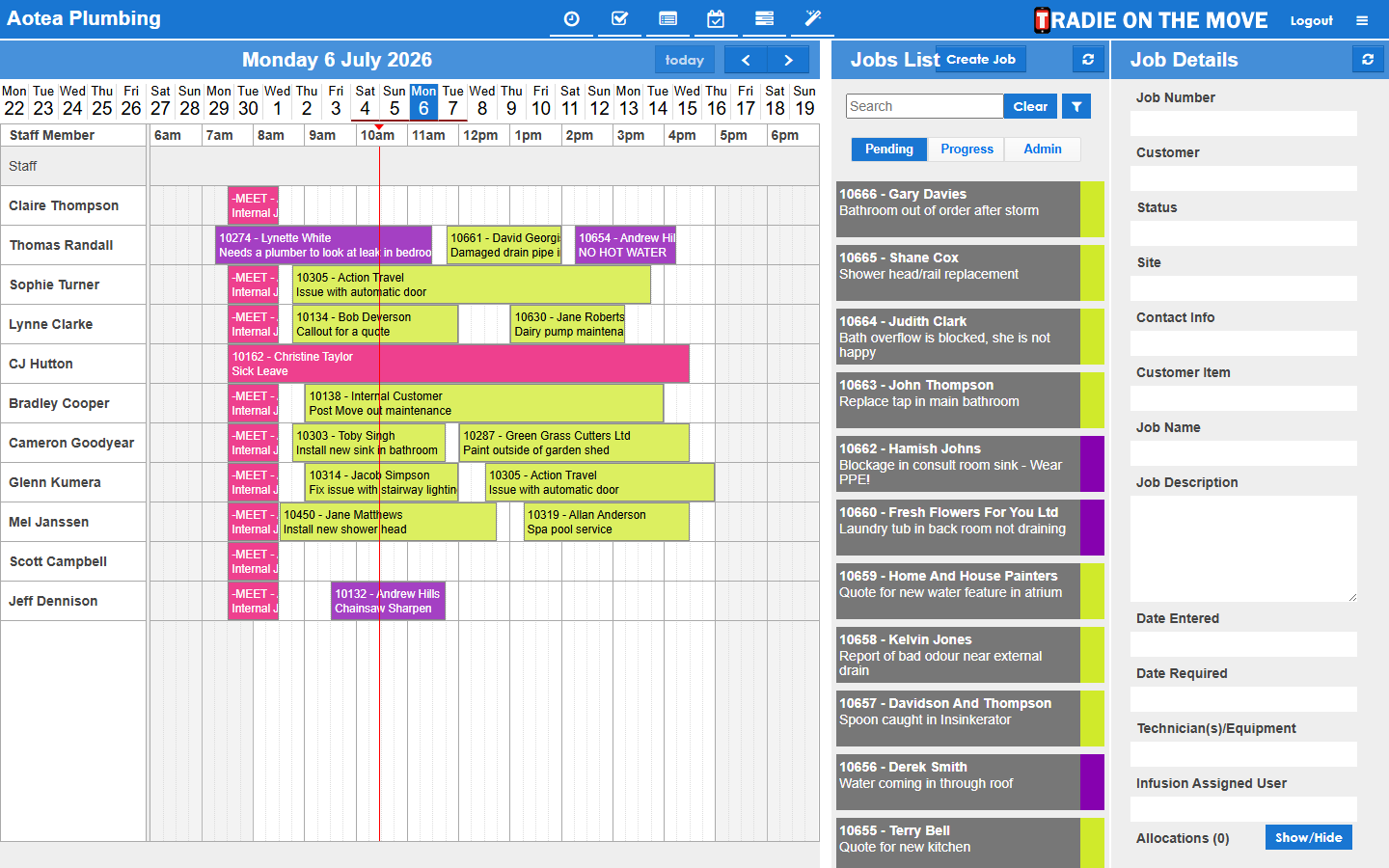
The calendar

Drag the job onto the person

The board is the whole product in one screen - the jobs list down one side, the people across the rows, and the detail of whatever you’ve selected underneath. Booking a job is a drag, not a form.

  • One row per team member or piece of equipment
  • Drag to book, drag the edge to change the hours, or book a run of days at once
  • Switch between business hours and a full 24-hour view
Set the service up once
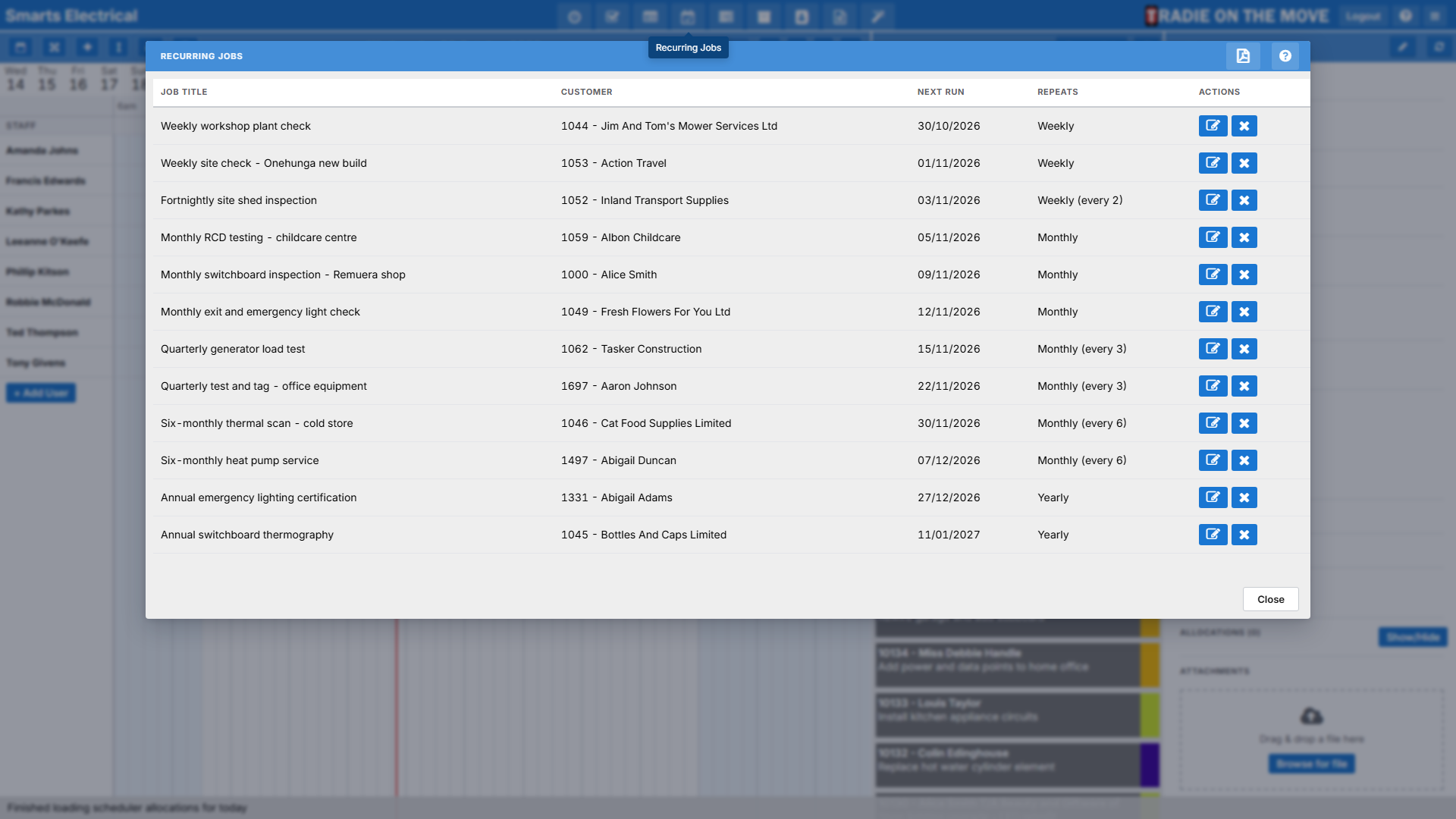
Recurring jobs

Set the service up once

Routine and maintenance work is where money leaks out of a trade business, because nobody is paid to remember it. Tradie remembers it - and shows you what it’s about to raise.

  • A template raises the real job on schedule, every time
  • Print what’s coming over any period before it arrives
  • The raised job behaves like any other - book it, log it, invoice it
Hours you can defend before they reach payroll
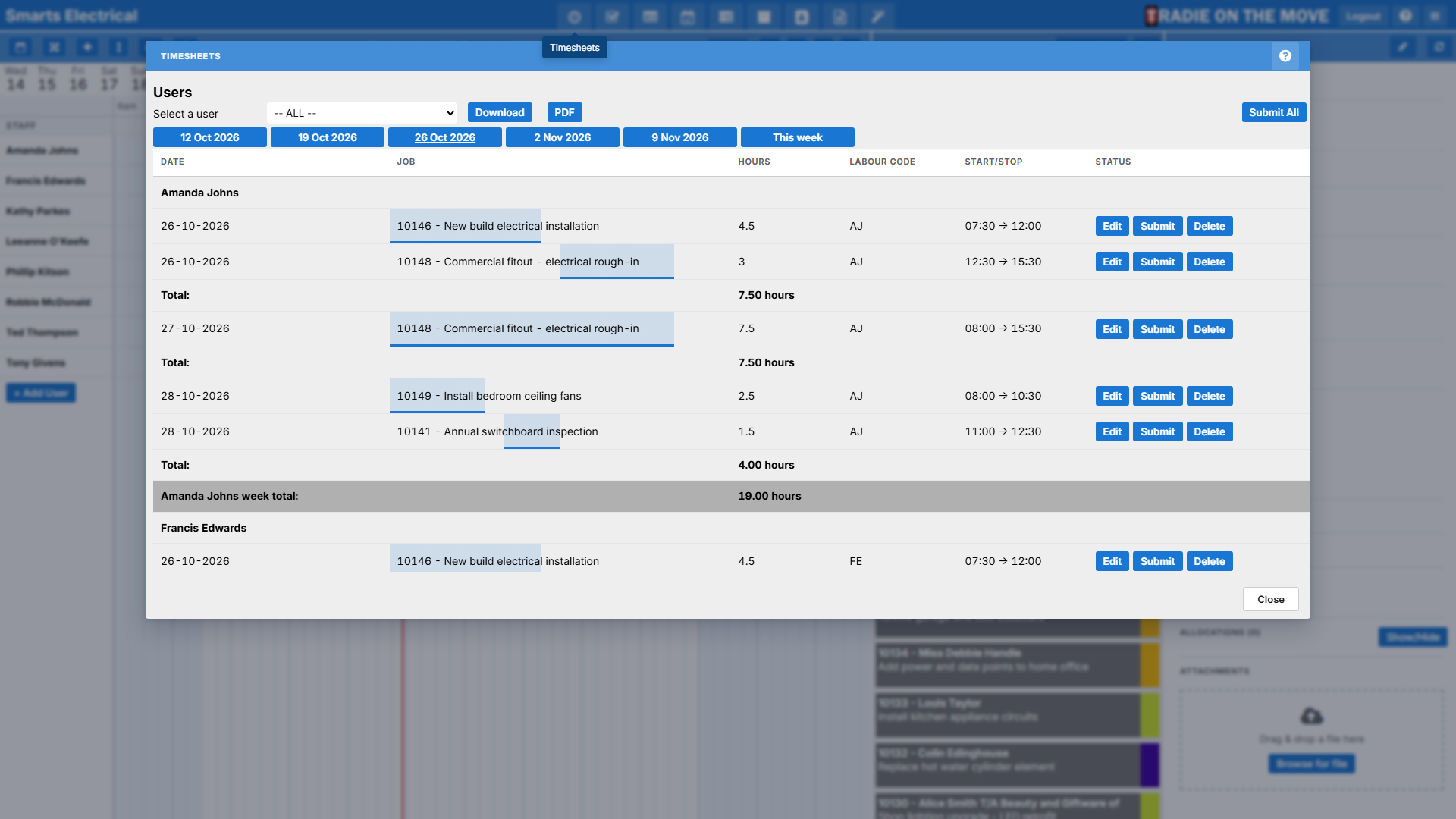
Timesheets

Hours you can defend before they reach payroll

Time is captured on site, not reconstructed on Friday. The Timesheets screen is where it gets checked, corrected and signed off, with the rules your business already runs on applied for you.

  • Automatic overtime, tracked lunch breaks and on-call allowances applied as the week is worked
  • Supervisor sign-off recorded against each entry, one at a time or a backlog at once
  • Export to Smartly payroll, or produce a PDF covering up to five weeks
Who it’s for

Three people, one board

Dispatchers

Book the day in a few drags, move work when it changes, and let the phones take care of telling everyone. The gaps in the calendar are the capacity you’re selling.

Supervisors

Check hours against what was booked, sign them off one entry or a whole backlog at a time, and see which safety forms actually came back.

Business owners

Know that the recurring work is being raised, the hours are reaching payroll, and nothing is sitting unbilled because a transaction failed quietly.

Before you ask

Scheduler questions

Does the field team have to do anything differently?

They work from the mobile app as they already do - the Scheduler is the office half of the same system. A booking you make appears on their phone, and the time and materials they log appear back on your board.

Can we book equipment as well as people?

Yes. Plant and equipment get their own rows on the calendar alongside team members, so a digger or a truck is booked the same way a person is, and double-booking is as visible as it would be for staff.

What if we run more than one branch?

The Location filter narrows the calendar and the jobs list to one branch or depot at a time, so a dispatcher only deals with their own patch. You can also switch between companies your sign-in covers without signing out.

How soon does the team see a change I make?

Straight away. Moving or reassigning a booking pushes to the team member’s phone as a notification, and you can send them a text reminder ahead of a start time as well. Their start, pause and finish come back to your board the same way.

Want the step-by-step detail? The Scheduler guide covers every screen, from booking a job to signing off a timesheet.

See the Scheduler run a day of your own work

We’ll build your real jobs on the board, book them onto your team, and show the hours coming back - against your own ERP.