
Report Designer

Build the form once - fill it in on every job

Drag together the checklists, certificates and sign-off sheets your business actually uses, put them in every team member’s pocket, and get a branded PDF back the moment one is finished. No developer, no template to fight, no version of the form that only lives on somebody’s laptop.

  • Build and change forms yourself, in an afternoon
  • Every PDF comes out looking like your business
  • Nothing comes back half-filled or re-typed

Included in your per-user subscription · build and change forms yourself, no developer.

The Report Designer canvas
Sound familiar?

Paperwork is where good jobs go wrong

Not because anyone is careless - because the form is a Word document, the process lives in somebody’s head, and the version on site is whichever one got emailed last.

“That checklist is a Word doc somebody keeps re-saving.”

One form, built once, on every phone - and what the field sees is always the current version.

“We pay someone every time a form needs changing.”

Drag the field where you want it and publish. The change is on the team’s phones, not in a quote.

“Our certificate looks like it came out of 1997.”

Your logo, your colours, your document headers and footers, on every PDF it produces.

“Half of it came back blank.”

Make a field required, and show the follow-up question only when the answer calls for it.

“They re-type the job number on every single form.”

Job fields fill in the job number, customer, site and order number on their own.

What you get

Six things that make the paperwork yours

A drag-and-drop designer in the Scheduler, and the forms it builds appear on the phone app your team already uses.

Build it by dragging

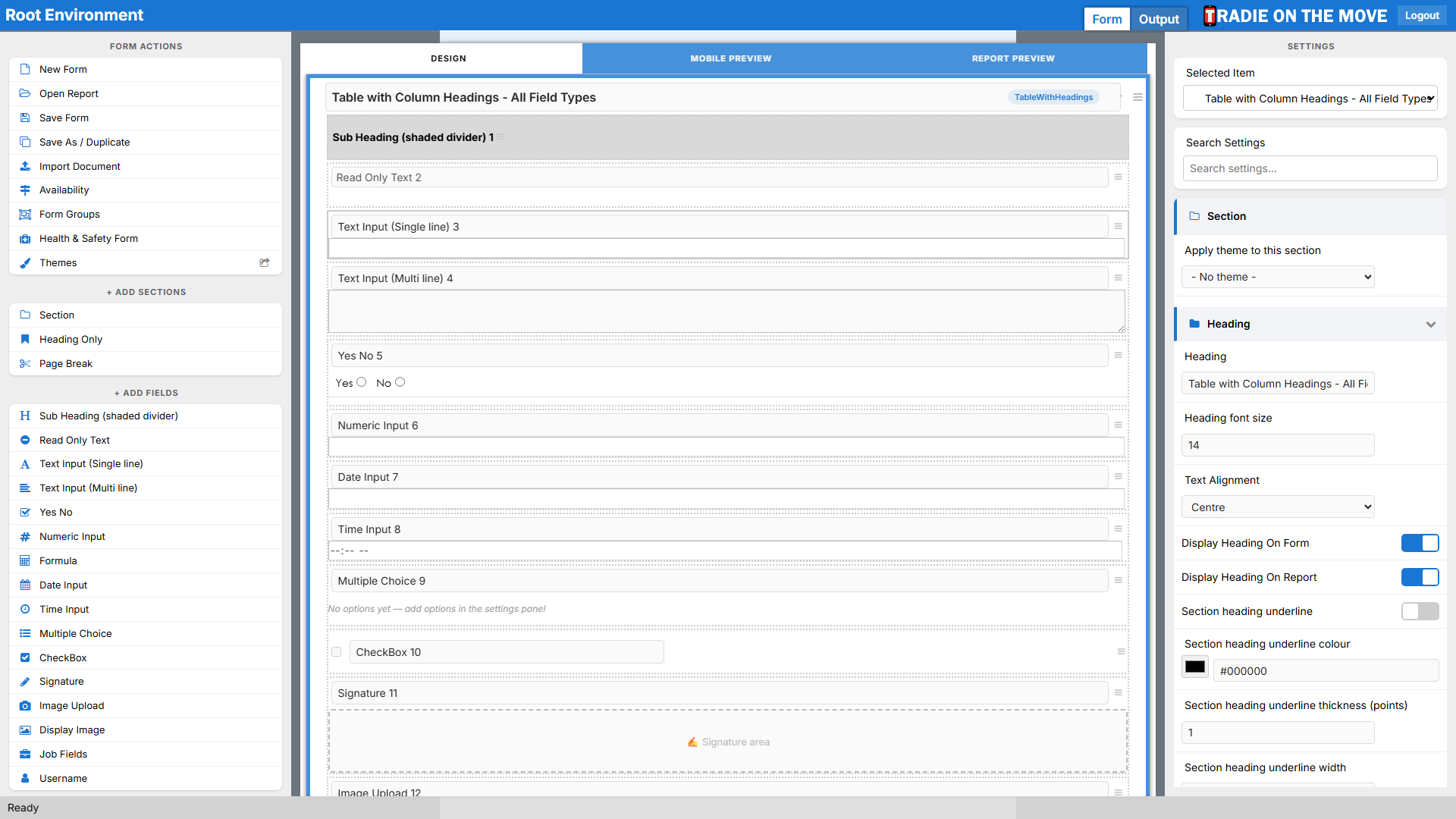
A palette of fields on one side, your form on the canvas, and a settings panel for whatever you have selected. Group fields into sections, break them up with sub headings and dividers, and preview the whole thing as the phone will draw it before anyone sees it.
Every kind of question you need

Single and multi-line text, numbers with a unit or a dollar sign, Yes/No with an optional N/A, radio buttons, dropdowns, tick boxes, dates, times, photos and a signature drawn with a finger - plus formula fields that calculate as the technician types.

Questions that appear when they matter

A child field stays hidden until the answer above calls for it, so a long compliance form reads as a short one on site. Add an "Other" option for the answer you did not think of, and mark the fields that must not be skipped.

A PDF that looks like your business

Your logo, your colours and document-control headers and footers, with each section printing as plain text, a table or a repeating data table - whichever suits the information. Share the styling across forms with a theme.

Choose exactly where it shows up

Put a form on the home screen, on a job’s tabs, or grouped with the forms it belongs beside. Decide who can use it and what happens when it is saved, so the right paperwork follows the right job without anyone searching.

Completed forms come back to you

Every submission lands in the Scheduler’s Completed Forms screen where you can read the answers and download the report. Pull one out as Word or PDF, or have it emailed automatically as soon as it is submitted.

End to end

From a blank canvas to a signed PDF

The same form, all the way through - and nothing in the middle needs a developer.

  1. 01 Build it on the canvas
  2. 02 Preview it as a phone
  3. 03 Publish it
  4. 04 It appears on the job
  5. 05 Filled in on site
  6. 06 Photos & signature captured
  7. 07 Held offline if needed
  8. 08 Report generated
  9. 09 Filed against the job
It comes back complete

Required fields and follow-up questions mean the form that arrives has the answers you actually needed.

It comes back branded

Every submission renders to a polished PDF with your logo and layout - ready to send to the customer as it is.

It comes back findable

Against the job, in Completed Forms, downloadable as Word or PDF, or emailed the moment it is submitted.

Palette on the left, your form in the middle
The designer

Palette on the left, your form in the middle

Pick a field, drop it where it belongs, and set it up in the panel on the right. The settings every field shares - label, required, where it prints - sit in the same place whatever you selected.

  • Sections, sub headings and dividers to group a long form
  • Each section prints as text, a table, or a repeating data table
  • Start from a copy, a file, or an imported Word document
Built for gloves and bright sun
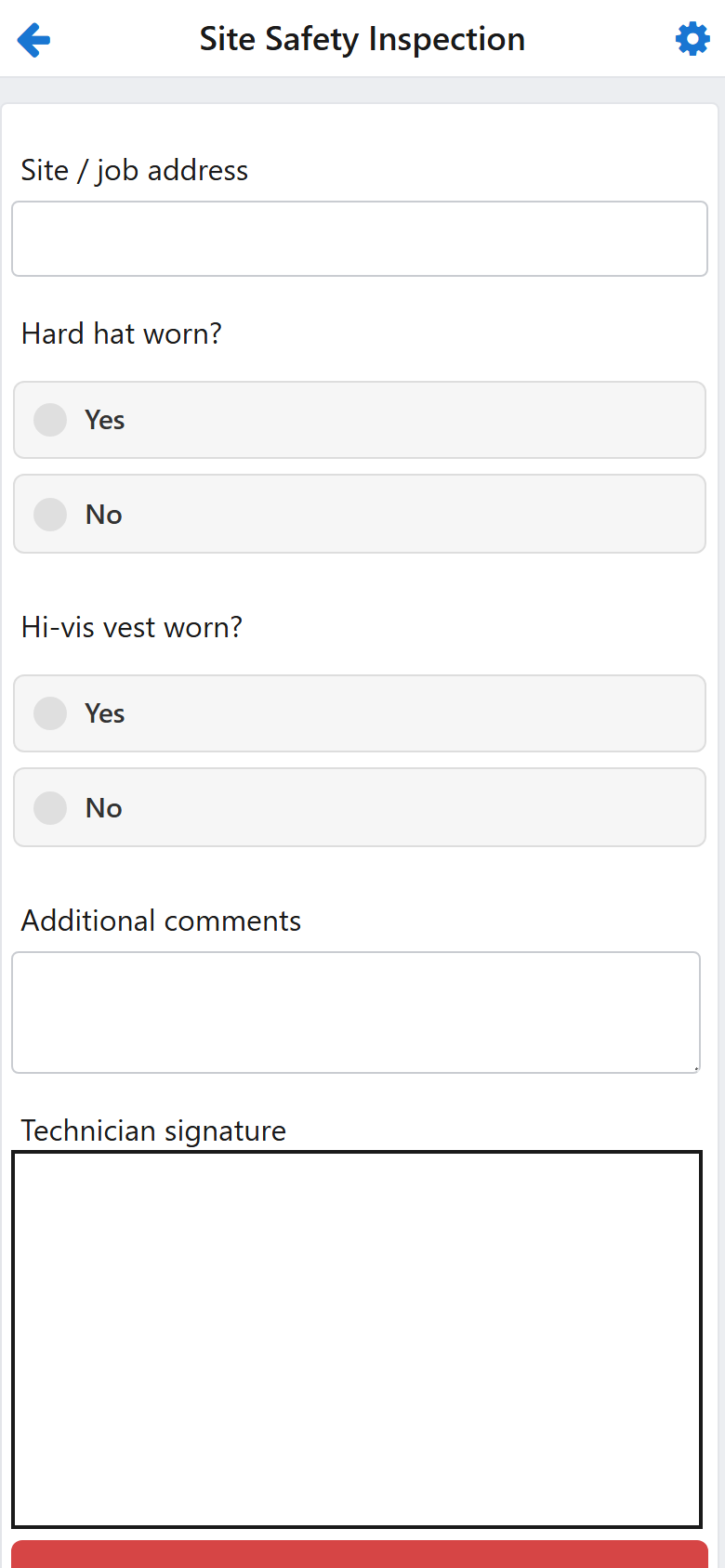
On the phone

Built for gloves and bright sun

The same form the team member opens on the job - a clean, guided layout rather than a desktop screen squeezed onto a handset, working with or without signal.

  • Follow-up questions appear only when the answer calls for them
  • Photos, signatures and comments captured on site
  • Park an unfinished form and pick it up on the next job
The same questions, row after row
Data tables

The same questions, row after row

Testing twelve circuits or eight fittings asks the same handful of questions each time. A data table collects one row per repetition and prints them as a table on the report.

  • One row per item, added on the phone as the work is done
  • Prints as a proper table rather than a wall of repeated headings
  • Formula fields can total a column as it is filled in
Who it’s for

Three people, one form builder

Office admins

Change a form the afternoon somebody asks for it, instead of adding it to a list for whoever built the last one.

Health & safety managers

Hazard checks, risk ratings and sign-offs captured the same way on every site, and a PDF you can hand an auditor.

Business owners

Paperwork that looks like the business you run, and proof that what you promised the customer was actually done.

Before you ask

Report Designer questions

Do we need a developer to build a form?

No. The Report Designer is drag and drop, inside the Scheduler you already use. If you can build a slide, you can build a form - and changing one later is the same job again, not a new quote.

Can we start from a form we already have?

Yes. Start from a copy of an existing form, from an exported file, or import a Word document and work from that. Themes let a set of forms share one look, so a branding change is made once.

What can the phone actually capture?

Text, numbers, dates and times, Yes/No and multiple-choice answers, calculated values, one photo per image field, and a signature drawn with a finger. Reference documents like PDFs and price lists live in the Document Vault rather than being uploaded through a form.

What happens when there is no signal on site?

The form is filled in and held on the device, then sent as soon as coverage returns - the team member does not have to remember to do anything, and nothing is lost if the phone goes flat in between.

Want the step-by-step detail? The Report Designer guide covers every field type, from a tick box to a data table.

Bring us the form you hate most

Send us the checklist or certificate your team fights with, and we’ll show you it rebuilt in the Report Designer, on a phone, with your branding on the PDF.